Welcome Email Sequence on a Free Plan: Kit vs Systeme.io
A 4-email welcome sequence without paying: Kit Free locks sequences, Systeme.io Free did not. The emails, setup, deliverability and real send numbers.
A welcome sequence is a few emails that go out automatically after someone signs up. We wanted one for people who join our free course, Scope a Freelance Project Before You Quote: four short emails over ten days on how to use it on a real quote.
The rule for this series is no paid upgrade. That ruled out our first choice and decided the tool.
Kit Free: sequences are an upgrade
Our newsletter and free checklist run on Kit's free plan, so we tried there first. On October 7 at 11:05 PM PT, Email sequences and Visual automations were both greyed out with "You're on a free plan. Upgrade to the Creator plan to unlock". The billing page offered Creator at $39/month. We weren't offered a trial.
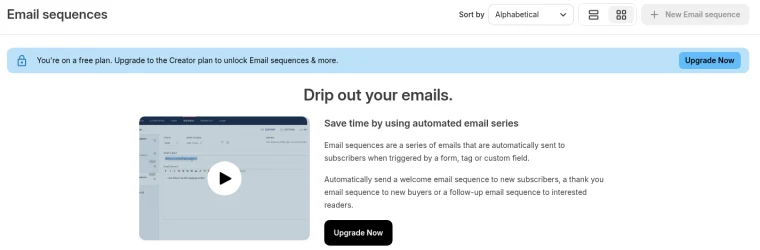
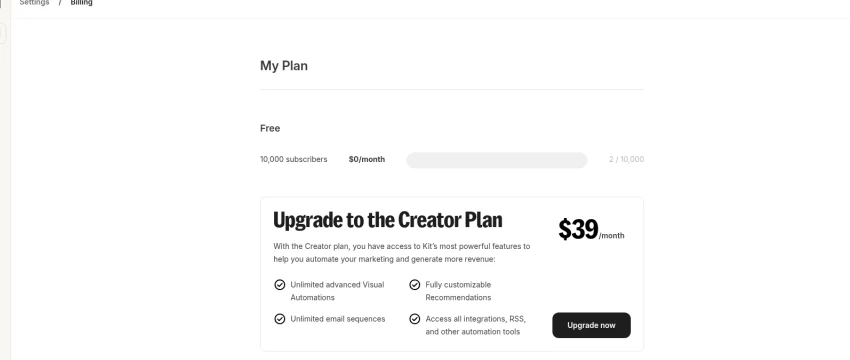
On Kit Free you can still send broadcasts by hand and deliver a lead magnet. But four emails that go out by themselves on set days need a paid plan. Our course lives on Systeme.io anyway, so we tried there.
Systeme.io Free: one campaign, attached to the one rule
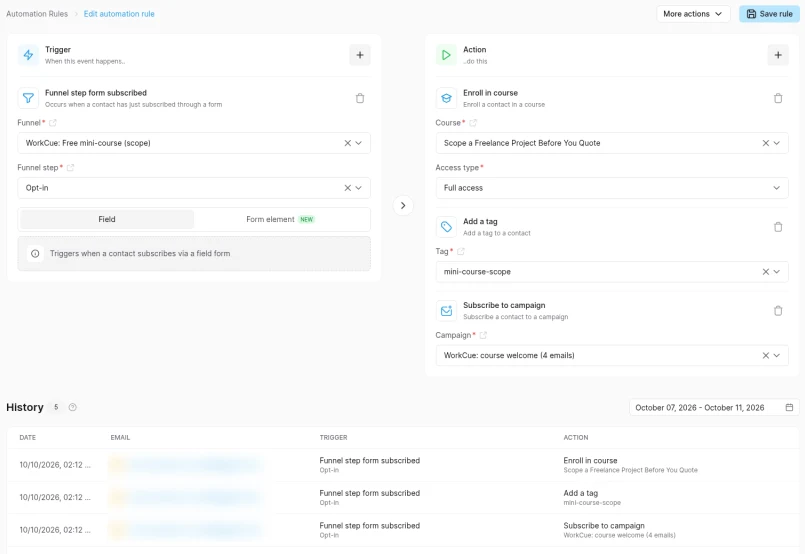
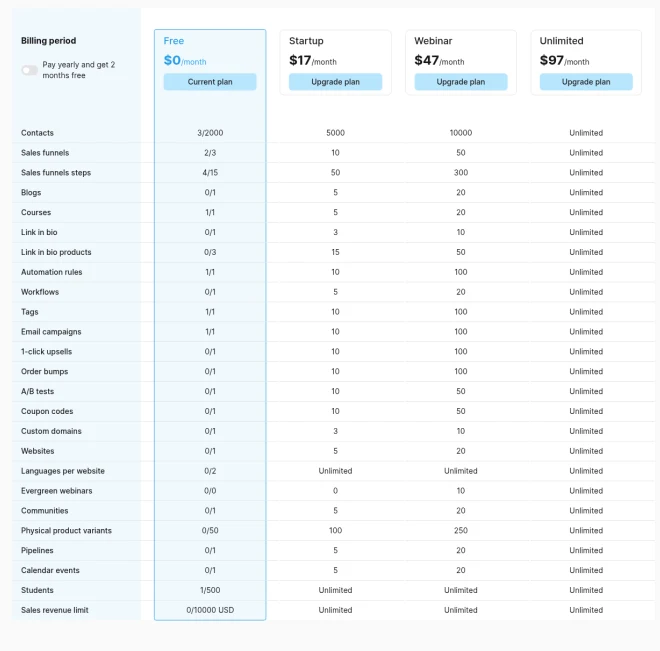
Systeme.io's free plan includes 1 email campaign (its name for a sequence), 1 automation rule and 1 workflow. Our free course already used the rule: when someone submits the opt-in form, enroll them in the course and add the tag mini-course-scope.
We had two options:
- Add a third action to the existing rule: Subscribe to campaign. Systeme.io counts rules, not actions, so this should still be one rule.
- Use the one workflow (trigger: enrolled in course, then subscribe to campaign). That would work too, but we were saving the workflow for an abandoned cart test.
We took the first. After saving, Automation rules stayed at 1/1 and Email campaigns showed 1/1.
Build it unattached, approve, then switch it on
Anyone who signs up for the course would get these emails, so the order mattered:
- Write the four emails. We drafted them ourselves (no outside AI tools) from the course and the checklist, with no claims the course doesn't back up.
- Build the campaign without attaching it to anything. Nobody can receive it yet.
- Test by hand. We added one test address (wc-test08) to the campaign manually, around 2:06 PM PT on October 10.
- Get approval. Dan approved all four emails on October 10 at 2:07 PM PT.
- Attach it: add the Subscribe to campaign action to the opt-in rule.
- Update what people are told. The opt-in small print and the thank-you page now say the emails are coming.
- Test the real path. A second test address (wc-test09) signed up through the live form at 2:12 PM PT. The rule history showed all three actions firing, with no manual step.
Tell people before they sign up
The small print under the form now reads: "5 short text lessons. Free, no card. You'll get a login by email from Systeme.io, the platform that hosts the course, then 4 short emails from WorkCue over 10 days on putting it to use. Unsubscribe any time." The thank-you page adds: "Over the next 10 days you'll also get 4 short emails from WorkCue with ways to use the course on a real quote."


Timing: delays count from the previous email
In a Systeme.io campaign, each email's delay counts from the previous email, not from signup. To send on days 1, 3, 6 and 10, the delays are 1, 2, 3 and 4 days. If you type 1, 3, 6 and 10, the last email lands on day 20.
The first delay ran to the minute: wc-test08 joined around 2:06 PM PT on October 10 and got email 1 at 2:07 PM PT on October 11. wc-test09 joined at 2:12 PM and got it at 2:12 PM PT.
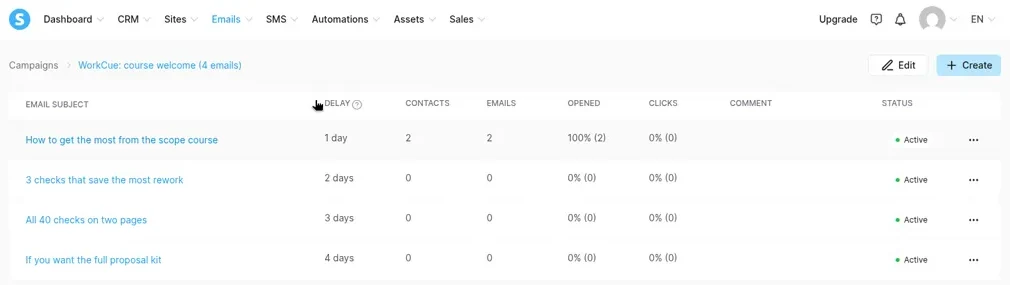
Email 2 arrived on schedule. Both test addresses got 3 checks that save the most rework from hello@useworkcue.com at 2:06 PM PT and 2:12 PM PT on Tuesday, October 13 (same minute offsets as email 1). Subject, preview line, and body matched what we published. Unlike email 1, Gmail filed both copies under Promotions (still labeled Important).
Email 3 arrived on schedule. All 40 checks on two pages reached wc-test08 at 2:08 PM PT and wc-test09 at 2:13 PM PT on Friday, October 16. Both copies landed in the Gmail inbox, marked Important, and linked the free 2-page 40-Point Freelance Scope Checklist PDF.
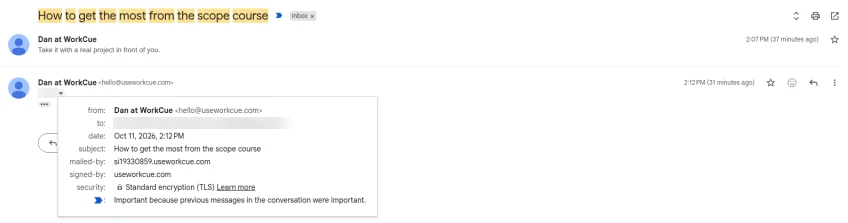
Email 4 arrived on schedule. If you want the full proposal kit reached wc-test08 at 2:06 PM PT and wc-test09 at 2:13 PM PT on Tuesday, October 20, again in the inbox and marked Important. It came from Dan at WorkCue (hello@useworkcue.com), mailed-by a useworkcue.com subdomain and signed-by useworkcue.com. Show original on the wc-test08 copy: SPF, DKIM (useworkcue.com) and DMARC all pass, delivered after 1 second. The body matched what we published: the $9 kit, the 30-day refund, no deadline, and the link to useworkcue.com/kit.
So all four emails landed on days 1, 3, 6 and 10 after signup, as planned (wc-test08 joined around 2:06 PM PT on October 10, wc-test09 at 2:12 PM PT).
Final campaign stats
Checked October 20, 2026, at 3:34 PM PT. Every number here is our own two test addresses, not audience results.
| Delay | Sent | Opened | Clicks | |
|---|---|---|---|---|
| 1. How to get the most from the scope course | 1 day | 2 | 100% (2, ours) | 0 |
| 2. 3 checks that save the most rework | 2 days | 2 | 0% | 0 |
| 3. All 40 checks on two pages | 3 days | 2 | 0% | 0 |
| 4. If you want the full proposal kit | 4 days | 2 | 0% | 0 |
All four emails are still Active, and both test contacts now sit at the last step. One thing to know: Systeme.io shows 0% opened for emails 2 to 4, even though we opened our test copies in Gmail. So its open count undercounted here. We didn't dig into why; treat open rates on these sends as a rough floor, not an exact number.
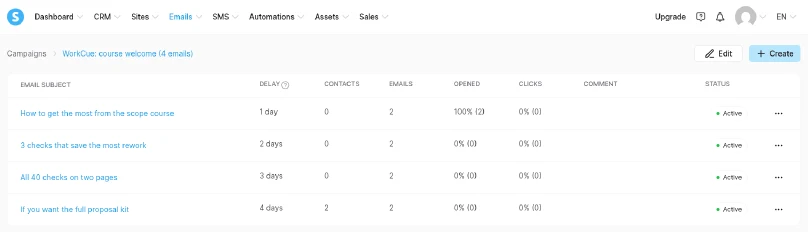
Real signups: none yet as of October 20, 2026. The account has 5 contacts, and all of them are our own test addresses or Dan's own address.
Deliverability: sending from our own domain
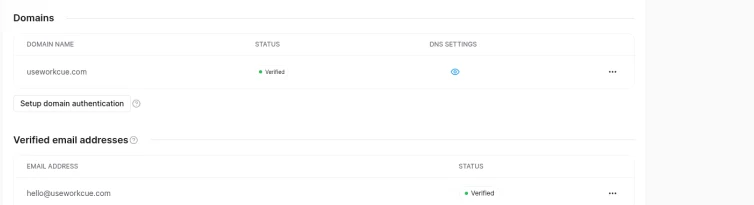
When we built the course on October 7, Systeme.io was still sending from its own fallback address because our domain authentication was Pending. By this run, useworkcue.com showed Verified, and hello@useworkcue.com was the sender.
Both test copies of email 1 landed in the Gmail inbox, not Promotions or spam. In Gmail's Show original, from Dan at WorkCue (hello@useworkcue.com):
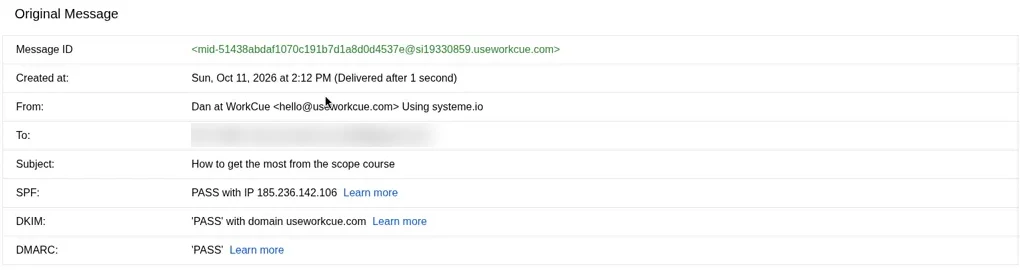
Systeme.io signs the email with our domain and uses a bounce address on a useworkcue.com subdomain, so SPF lines up with our domain too. The free plan still adds a "Sent with Systeme.io" footer.
The four emails, in full
These are exactly what a new course signup receives. Each email is short and links to one thing, and only the last one mentions the paid kit, with the refund terms and no deadline.
Email 1 (day 1, delay 1 day): How to get the most from the scope course
Preview line: Take it with a real project in front of you.
Hi there,
Thanks for signing up for "Scope a Freelance Project Before You Quote". Your login came in a separate email from Systeme.io. If you can't find it, search your inbox for "Your access to training".
The five lessons take about 10 to 15 minutes to read. They work best with a real project in front of you: a lead you're about to quote, or the last job that ran over.
A simple order:
- Read lessons 1 to 3 and run the checks against that project.
- Every check you can't tick becomes a question for the client, an assumption, or a line under Not included.
- If you use an AI tool, lesson 4's prompt turns your call notes into a one-page scope brief. It's optional.
Start here: https://dan-mercede.systeme.io/school/course/scope-before-you-quote
One question, if you have a minute: what kind of projects do you usually quote? Just hit reply.
Dan, WorkCue
Email 2 (day 3, delay 2 days): 3 checks that save the most rework
Preview line: Revisions, feedback time, and what pauses the clock.
Hi there,
If you only keep three checks from the course, I'd keep these. They're quoted word for word from the 40-point checklist the course is built on.
"Revision rounds are numbered, and "revision" vs "new request" is defined" Without this, every new idea can arrive as "a quick revision".
"Feedback turnaround time is stated in business days" If your timeline assumed two days of feedback and it takes two weeks, the deadline moves but a fixed price doesn't.
"It's clear what pauses the clock (late inputs, late feedback)" This is the line you point to when content arrives late and the launch date is still expected.
When a client asks for something outside the scope anyway, this guide shows how to reply with a change order instead of absorbing the work: https://useworkcue.com/guides/ai-scope-creep-change-orders
Dan, WorkCue
Email 3 (day 6, delay 3 days): All 40 checks on two pages
Preview line: A free PDF to tick during a call.
Hi there,
The course walks through the checks one area at a time. If you'd rather have all 40 on one sheet to tick during a client call, there's a free 2-page PDF: The 40-Point Freelance Scope Checklist.
It has the same checks in eight groups: people and decisions, outcome, deliverables, inputs and dependencies, timeline, money, risk, and proposal hygiene. There's space for the client, project and date at the top. Run it before the proposal, then again before kickoff, so nothing changes quietly between the two.
The PDF is delivered by Kit, a different email tool from the one sending this message. Signing up for it puts you on WorkCue's Kit email list too, and you can unsubscribe from each one separately.
Get the PDF: https://useworkcue.com/free-scope-checklist
Dan, WorkCue
Email 4 (day 10, delay 4 days): If you want the full proposal kit
Preview line: What's in it, who it's not for, and the refund.
Hi there,
This is the last email in the course welcome series.
If the course helped and you write proposals often, WorkCue sells one product: the Freelancer Proposal Autopilot Kit, $9. It contains:
- 18 copy-ready AI prompts for freelance proposals, each with a filled example
- Saved instructions for ChatGPT, Claude and Gemini
- A one-page proposal template
- A Make lead-to-proposal automation
It's not for agencies that need team approvals and e-signature tracking, for anyone who wants AI to set prices or send proposals unsupervised, or for hourly-only work with no scoping.
If it isn't useful, there's a 30-day, no-questions refund: reply to your Gumroad receipt.
There's no deadline and no discount. The course stays free either way.
Details: https://useworkcue.com/kit
Dan, WorkCue
What we'd tell you to check
- Your free plan's real limits. Kit Free: no sequences. Systeme.io Free: 1 campaign, 1 rule, 1 workflow.
- Whether adding an action counts as a new rule. On Systeme.io it didn't. Check the My plan page before and after.
- How delays count. On Systeme.io, from the previous email.
- What the signup page promises. If people will get emails, say so before they sign up.
- Your sender domain. Authenticate it, then check Show original for SPF, DKIM and DMARC.
Your checklist
- Check whether your email tool's free plan includes sequences before writing them
- Build the sequence unattached and test it on your own address first
- Get the copy approved before attaching it to a live form
- Set delays relative to the previous email if your tool counts that way
- Update the opt-in small print and thank-you page
- Sign up through the live form with a test address and confirm the first email arrives
Related guides
Systeme.io Free Course With Auto-Enrolment: A Real Build
A free 5-lesson course on Systeme.io's Free plan with an opt-in page that auto-enrols and tags people: every screen, plan limits and gotchas.
Kit Free Plan Setup: Sender, First Form, Test Subscriber
Kit free plan setup on a real account: signup, what the plan includes, sender and address, a first inline form and a test subscriber, plus gotchas.
Kit Tags and Segments on the Free Plan (Tag From a Form)
Kit tags and segments on the free plan: no auto-tag rule, so we tagged from the form itself, built five segments and excluded test subscribers.