Abandoned Cart Email on Systeme.io Free: A Real Test
Abandoned cart email on Systeme.io Free: we built a real checkout reminder with the plan's one workflow, tested it, and explain why we did not ship it.
Abandoned cart emails remind someone who started checking out but didn't pay. Systeme.io's free plan can send one: a two-step order form captures the email before the card step, and a workflow sends a reminder later.
We built it for our $9 kit and tested it with our own address. It worked. Then we decided not to put it on our live checkout, for two reasons we found in the run:
- The workflow can't check whether someone bought. There's no purchase filter, so a real buyer would still get "you didn't finish checking out" an hour after paying.
- The two-step form forces a shipping block. Full address, city, country and post code, for a digital download, and it can't be removed.
What Systeme.io Free gives you
From Systeme.io's help pages, read October 10, 2026:
- A two-step order form collects contact details first and payment second, and "customers who don't complete their purchase will automatically be added to your contact list" (two-step order form).
- A workflow can start on "Funnel form subscribed", wait, make a Yes/No decision and send an email (workflows).
On Free, our one automation rule and one tag already run the free course opt-in, and the one email campaign is for the welcome series. So the reminder had to be a Send an email step inside the plan's single workflow.
Why we built it on a copy
Switching the live checkout to two steps changes what every real buyer sees, and starts emailing people who stop at payment. We wanted to see it work before deciding. So we made a fresh funnel, "abandoned cart demo (unlinked)", with the kit at $9 and no order bump, and never linked it anywhere.
We couldn't just duplicate the live funnel: as in our order bump run, the copy brings the bump with it and hits Free's 1-bump limit. A new funnel also defaults to Euro, so set it to U.S. Dollar.
The two-step form and its shipping block
In the editor the element is called Two-step payment form, in the Payment group. We didn't hit an upgrade prompt. Its fields are fixed: first and last name, email, and a Shipping block with full address, city, country and post code. You can change the labels but not remove the block.
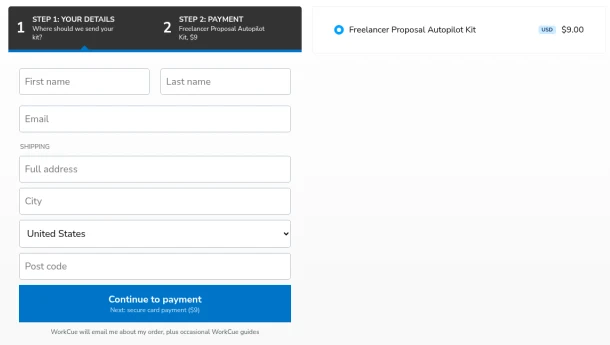
We used the consent line from our live checkout as the footer: "WorkCue will email me about my order, plus occasional WorkCue guides." The reminder depends on that consent. Step 2 showed card, Klarna and Apple Pay.
Asking for a postal address to sell a PDF adds friction and collects data we don't need. That alone made us hesitate about using it on the live checkout.
The workflow
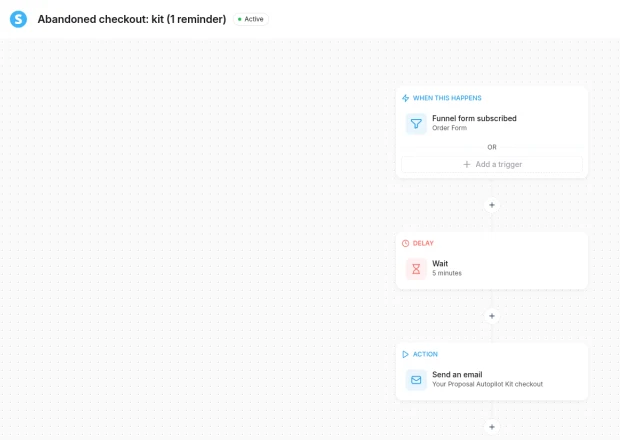
"Abandoned checkout: kit (1 reminder)":
- Trigger: Funnel form subscribed, on the demo's Order Form step. Under Details, choose Field. The "Form element" option said there was no form element on the page, so Systeme treats the two-step form as a field form.
- Delay: 5 minutes for the test. The real setting would be 1 hour.
- Decision: skipped. See below.
- Action: Send an email from Dan at WorkCue.
No "has bought" filter
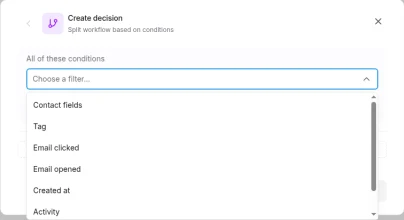
The plan was a decision step: if the contact bought, stop. The decision filters on Free were Contact fields, Tag, Email clicked, Email opened, Created at, Activity ("No activity since" a date) and Contact state (Active, Unsubscribed, Bounced). None checks for a purchase.
The usual fix is a tag: a "New sale" rule tags buyers, and the workflow checks the tag. On Free, our only rule and only tag are already used by the course opt-in. A second trigger on the same workflow could add the tag, but there's no free tag left. So every buyer would get the reminder too. The email says "If you've already bought it, ignore this", but we'd rather not send it to buyers at all.
The test
At 3:45:33 PM PT we filled in step 1 with our labelled test address and a dummy address, clicked Continue to payment, and closed the tab at the card step without entering anything. The contact appeared straight away, with the demo funnel as its source, and the contact's Workflows tab showed it waiting at "Delay 5 minutes".
The reminder arrived at 3:51 PM PT, about six minutes later, from Dan at WorkCue (hello@useworkcue.com), in the inbox rather than spam:
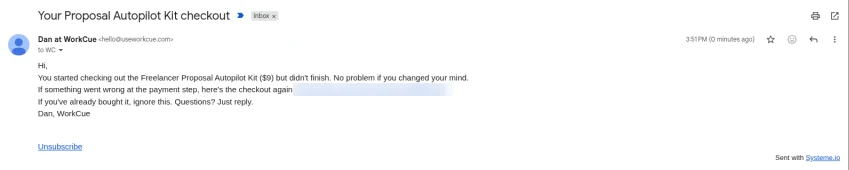
The email, in full: "You started checking out the Freelancer Proposal Autopilot Kit ($9) but didn't finish. No problem if you changed your mind. If something went wrong at the payment step, here's the checkout again: [link]. If you've already bought it, ignore this. Questions? Just reply." One email only. There's no discount and no "last chance", because nothing expires.
What we couldn't test: what a buyer receives. That needs a real purchase. Systeme.io has no Stripe test mode, and our rule is no real-money purchases. Given the filters, a buyer would get it.
Cleanup and counters
We set the delay back to 1 hour and deactivated the workflow with "Deactivate workflow and cancel related scheduled tasks". Then we deleted the demo funnel and kept our test contact. The live checkout, rule, tag, campaign and Stripe weren't touched.
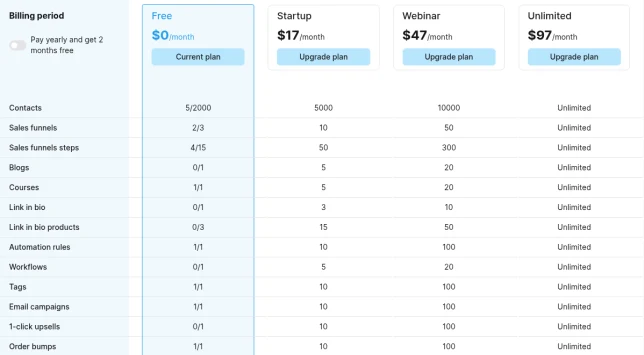
An inactive workflow doesn't count: Workflows showed 0/1 before and after. The draft's trigger points at the deleted funnel, so it would need re-pointing before any real use.
When it would make sense
On Systeme.io Free, abandoned cart is worth switching on if:
- you have a free tag for buyers (a "New sale" rule adds it, and the workflow checks it before sending), and
- the shipping block is acceptable, or you sell something physical anyway.
We have neither, so we didn't use it. A higher plan (more tags and rules) or a checkout without shipping fields would change that, and we'll update this guide if we do.
Your checklist
- Check that your plan has a spare tag and rule to mark buyers before you build
- Look at the two-step form's fixed fields; decide if shipping fields are acceptable
- Build on an unlinked copy first, with your own test address
- Test with a short delay, then set the real one before going live
- Keep it to one plain reminder; no fake deadlines
- Deactivate with "cancel related scheduled tasks" when you stop
Related guides
Systeme.io Order Bump and Upsell on the Free Plan
A real $5 order bump on Systeme.io's Free plan, delivered through the free community, plus a demo upsell: the limits, gotchas and what we could not test.
Sell a Digital Download on Systeme.io Free With Stripe
Sell a digital product on Systeme.io's Free plan: Stripe connection, price plan, a trimmed order form and a download button, from a real $9 setup.
Refund and Support Reply Templates for a Digital Product
Refund and support reply templates for a small digital product, matched to a 30-day refund policy and real Gumroad and Systeme.io refund steps.