Leaving Lemon Squeezy: Where to Sell a $9 Download Now (Stripe, Polar, Paddle, Creem)
Lemon Squeezy stops processing on March 31, 2027. Compare Stripe Managed Payments, Polar, Paddle and Creem for a $9 digital download: fees with the math, sales tax, file delivery, license keys, affiliates, payouts and seller countries, plus free file delivery with Kit.
On November 16, 2026, Lemon Squeezy announced it is winding down. If you sell an ebook, a template pack or a small plugin there, your checkout keeps working until March 31, 2027, and then it stops. Lemon Squeezy recommends Stripe Managed Payments, Stripe's own merchant of record product, but Managed Payments doesn't deliver files, issue license keys or run affiliates, and it only accepts sellers based in a list of supported countries.
This guide compares the four options most small sellers are looking at, Stripe Managed Payments, Polar, Paddle and Creem, for one concrete case: a $9 digital download. We show what you keep from each sale with the math written out, explain who files the sales tax, and then show how to rebuild file delivery for free with Kit if the payment tool you pick doesn't do it.
How we checked: every number and feature below comes from the provider's own pricing page, docs or help center, opened on November 16, 2026. Each one is linked. Where a page didn't say something clearly, we say so instead of guessing. We didn't take a live payment with any of these providers, and we're not in any of their affiliate programs, so WorkCue earns nothing if you sign up.
First: merchant of record vs a plain payment processor
This is the part most fee tables skip, and it decides which tools you can even consider. (It's also the fee and sales tax explainer we promised back in October.)
A plain payment processor (regular Stripe, PayPal, or Kit's built-in checkout) moves the money. You are the seller. If a customer in Germany buys your ebook, the VAT on that sale is your problem: you work out the rate, collect it, register where you have to, file and pay. US states each set their own sales tax rules for digital goods. Tools like Stripe Tax can calculate the tax for you, but you're still the one responsible for it.
A merchant of record (MoR) resells your product. Legally, the customer buys from the MoR, and the MoR pays you. Because it's the seller, it calculates, collects, files and pays the sales tax, VAT and GST on covered sales. It usually handles fraud, disputes and payment questions too. Lemon Squeezy was a merchant of record. So are all four options in this guide.
The trade:
| Plain processor | Merchant of record | |
|---|---|---|
| Typical fee | Lower (Stripe's US card rate is 2.9% + 30¢) | Higher (3.9% to 5% plus a fixed fee, or Stripe's rate plus 3.5%) |
| Who owes sales tax and VAT | You | The MoR, on covered sales |
| Who handles chargebacks and payment support | You | Mostly the MoR |
| Name on the customer's statement | Yours | The MoR's (for example LINK.COM* for Managed Payments) |
| Good for | Selling mostly in your own country, low volume, or when you already have an accountant handling tax | Selling to buyers in many countries without registering for tax in each one |
Note what the MoR fee is charged on. Stripe Managed Payments, Polar and Creem all say their percentage applies to the total the customer pays, including tax. So on a sale with 20% VAT, the percentage is taken from the bigger number. The worked examples below include that.
Lemon Squeezy's notice puts it plainly: if you move to a provider that isn't a merchant of record, "your business becomes responsible for tax compliance in every applicable jurisdiction." For a $9 product, paying an accountant to handle that usually costs more than the extra MoR fee.
This isn't tax advice. If you're unsure what you owe where you live, ask a local accountant.
The four options at a glance
All four are merchants of record. Checked November 16, 2026.
| Stripe Managed Payments | Polar | Paddle | Creem | |
|---|---|---|---|---|
| Standard fee | 3.5% + Stripe processing (US cards 2.9% + 30¢) | 5% + 50¢ (free Starter plan) | 5% + 50¢ | 3.9% + 40¢ |
| Extra fees we found | +1.5% international cards; currency conversion extra | +1.5% non-US cards | Under $10 products: "contact us for bespoke pricing" | +2% on affiliate sales, +2% splits, +5% recovered carts |
| Lemon Squeezy mover deal | 1.5% instead of 3.5% until Dec 1, 2027 | None published | None published | None published |
| File delivery | No | Yes (File Downloads benefit, up to 10 GB per file) | No in Paddle Billing (you build it with webhooks) | Yes (File Downloads) |
| License keys | No | Yes (with activation limits) | No in Paddle Billing (build your own) | Yes (with activation limits) |
| Affiliates | No (connect another tool) | No built-in program; documents an Affonso integration | No built-in program; supports third-party affiliate tools | Yes, built in (Affiliate Hub, +2% fee) |
| PayPal | No | Not listed | Yes | Not listed |
| Payouts | Standard Stripe payouts | Manual withdrawals; 7-day settlement for new accounts; $10 minimum (USD); Stripe payout fees passed on | Monthly (created on the 1st, sent by the 15th); $100 minimum | 1st and 15th of the month; $50 minimum; fee 7 USD/EUR or 1%, whichever is higher |
| Seller in India | No | Yes | Yes | Yes |
| Seller in Ghana | No | Yes | Yes | No (not on the list) |
| Seller in Bangladesh | No | Yes | Yes | Yes, with bank partner restrictions |
Sources: Stripe Managed Payments, Stripe pricing, Managed Payments eligibility, Polar fees, Polar supported countries, Polar payouts, Paddle pricing, Paddle supported countries, Paddle payouts, Creem pricing, Creem supported countries, Creem payouts. All checked Nov 16, 2026.
What you keep from a $9 sale
Two cases, using each provider's published standard rate. We rounded to the cent at the end.
Case 1: a US buyer with a US card, no sales tax
Many US states don't tax digital downloads, so the buyer pays $9.00 and the fee is worked out on $9.00.
| Provider | Fee math on $9.00 | Total fee | You keep |
|---|---|---|---|
| Stripe Managed Payments (standard) | 3.5% × $9 = $0.315, plus processing 2.9% × $9 + $0.30 = $0.561 | $0.88 | $8.12 |
| Stripe Managed Payments (Lemon Squeezy mover promo) | 1.5% × $9 = $0.135, plus processing $0.561 | $0.70 | $8.30 |
| Polar (Starter) | 5% × $9 = $0.45, plus $0.50 | $0.95 | $8.05 |
| Paddle | 5% × $9 = $0.45, plus $0.50 | $0.95 | $8.05 |
| Creem | 3.9% × $9 = $0.351, plus $0.40 | $0.75 | $8.25 |
| Lemon Squeezy today, for reference | 5% × $9 = $0.45, plus $0.50 | $0.95 | $8.05 |
Case 2: a buyer in France with a non-US card (20% VAT)
The buyer pays $9.00 plus $1.80 VAT, so the total is $10.80. The MoR sends the $1.80 to the tax office, and the percentage fees are worked out on $10.80. You keep $9.00 minus the fees.
| Provider | Fee math on $10.80 | Total fee | You keep |
|---|---|---|---|
| Stripe Managed Payments (standard) | 3.5% = $0.378; processing 2.9% + $0.30 = $0.613; international card 1.5% = $0.162 | $1.15 | $7.85 |
| Stripe Managed Payments (mover promo) | 1.5% = $0.162; processing $0.613; international card $0.162 | $0.94 | $8.06 |
| Polar (Starter) | 5% + $0.50 = $1.04; non-US card 1.5% = $0.162 | $1.20 | $7.80 |
| Paddle | 5% + $0.50 = $1.04 (see the note below) | $1.04 | $7.96 |
| Creem | 3.9% + $0.40 = $0.821 (Creem says no international card fees) | $0.82 | $8.18 |
What these tables leave out, on purpose:
- Stripe currency conversion. Stripe's pricing page lists an extra fee "if currency conversion is required." If the French buyer pays in euros and you're paid in dollars, add that on top. We didn't model it because the exact rate depends on your account.
- Stripe processing rates by country. We used Stripe's US rate. If your Stripe account is in another supported country, your processing rate is different.
- Paddle's base and small-order pricing. Paddle's pricing page says "5% + 50¢ per Checkout transaction" but doesn't say whether that's charged on the price or on the total with tax. We assumed the total, like the others. The same page says products under $10 can ask for bespoke pricing, so at $9 it's worth asking Paddle directly. Not verified.
- Payout fees. These come out when you withdraw, not per sale. Polar passes on Stripe's payout fees ($2 per month with active payouts, 0.25% + $0.25 per payout, plus 0.25% to 1% currency conversion). Creem charges 7 USD or EUR, or 1%, whichever is higher, per payout. Paddle says most countries pay nothing, but some pay a $15 SWIFT fee. At $9 a sale, batching payouts matters: one $50 Creem payout costs $7.
- Refunds and disputes. Polar keeps the original fee on refunds and charges $15 per dispute. Check each provider's terms for theirs.
The short version on fees: for a US seller who qualifies, Managed Payments with the mover promo is the cheapest per sale until December 1, 2027, and Creem is the cheapest standard rate. But fees aren't the whole story. Managed Payments doesn't deliver your file, so you still need something that does.
Which one fits you
You're in India, Ghana, Bangladesh or another country Stripe doesn't list. Managed Payments is out. Stripe's eligibility page lists 37 supported business locations: Canada, the US, most of Europe, Australia, Hong Kong, Japan and Singapore. India, Ghana and Bangladesh aren't on it. Your options:
- Polar pays out through Stripe Connect Express, which covers far more countries than regular Stripe. India, Ghana and Bangladesh are all on Polar's payout list. Polar's FAQ says this works even where regular Stripe is invite-only.
- Paddle works with software businesses anywhere except a list of sanctioned and restricted countries. India, Ghana and Bangladesh aren't on that list. Paddle describes itself as a home for software businesses, so if you sell an ebook or templates, check its acceptable use policy before you apply.
- Creem supports India and Bangladesh (Bangladesh with bank partner restrictions). Ghana isn't on its list. Creem's own page says 87 countries in one place and 86 in the table header, so check the table for your country.
Lemon Squeezy also mentions forming a US company through Stripe Atlas to qualify for Managed Payments. That's a big step for a $9 product. Talk to an accountant first.
You sell a file and want it handled for you, no code. Polar or Creem. Both deliver files after payment and keep them in a customer portal. Managed Payments and Paddle Billing don't.
You sell software and need license keys. Polar and Creem both issue keys with activation limits and an API to validate them. On Managed Payments or Paddle Billing, you'd connect a separate licensing tool or build one.
You want affiliates. Creem is the only one of the four with a built-in program (it adds a 2% fee on affiliate sales). For the others, you connect a separate affiliate tool, which usually has its own monthly price.
You're a US or EU seller, you only sell a couple of files, and you want the lowest fee. Managed Payments with the 1.5% mover promo, plus free file delivery through Kit (next section). Remember the promo ends December 1, 2027, after which it's 3.5% plus processing.
Your buyers pay with PayPal. Paddle is the only one of the four that lists PayPal. Managed Payments doesn't support it, and Polar's and Creem's payment method pages don't list it.
Creem needs your own domain. Creem's account review requires a website on your own custom domain. Social profiles, free hosting subdomains and checkout pages aren't accepted.
Rebuild file delivery for free with Kit
If you pick Managed Payments (or Paddle Billing), nothing sends the buyer their file. Lemon Squeezy's own fulfillment page says you either build it yourself or use a third-party tool. For a $9 PDF or template pack, Kit's free plan can do the job.
There are two ways to do it. Pick one.
Option A: your MoR checkout, then a free Kit page that delivers the file
The buyer pays on a Stripe payment link (or another checkout), gets redirected to a Kit landing page, enters their email, and Kit's confirmation email delivers the file. You keep the merchant of record for tax, and Kit costs nothing.
Be honest with yourself about the weak spot. Anyone who has the Kit page's address can get the file without paying, because the page doesn't know who paid. For a $9 PDF, that's usually an acceptable risk (Kit's own paid product receipts work the same way: Kit says the download link "works multiple times and for anyone who has it"). For software with license keys, it isn't. Use Polar or Creem for that.
Kit's free plan includes unlimited forms and landing pages and up to 10,000 subscribers, but not automations or email sequences (Kit Free plan, checked Nov 16, 2026). That's fine here: the confirmation email does all the work.
Step 1: Create the landing page. In Kit, go to Audience growth > Landing pages & forms and stay on the Landing Pages tab. Click New landing page, pick Classic builder, then click Choose on a simple one-screen template.
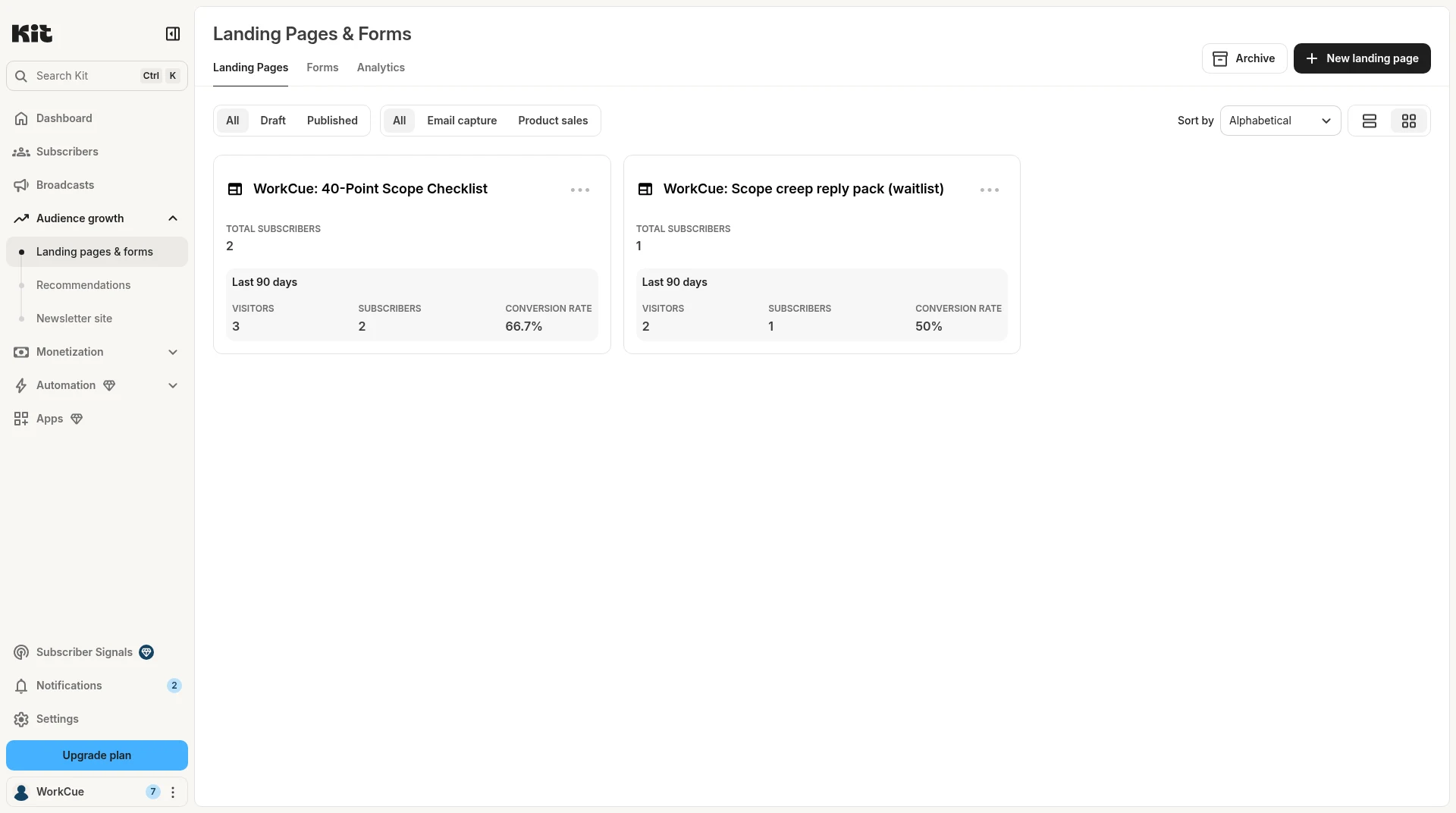
Step 2: Write it for buyers, not for strangers. Click any text in the editor to change it. Rename the page with the pencil next to its name at the top (ours is "LLS demo download (test)"). Headline: "Thanks for buying! Get your download". Text: "Enter the email you used at checkout and we'll send your download link. Check your inbox and click Confirm and download." Button: "Send my download". Swap the template's image for your product's cover, and add a line of small print about what else they'll get from you, if anything, and that they can unsubscribe. Some templates have extra sections below the main block, like a numbered "1, 2, 3" row with "Heading 2" placeholders. Fill them in or delete them: placeholder text doesn't show on the live page, but the empty section and its number images do. The template's footer may also carry a stale "© 2020 All rights reserved" line, so check that too. Along the top of the editor you'll see Preview, Reports, Settings, Share and Save & Publish.
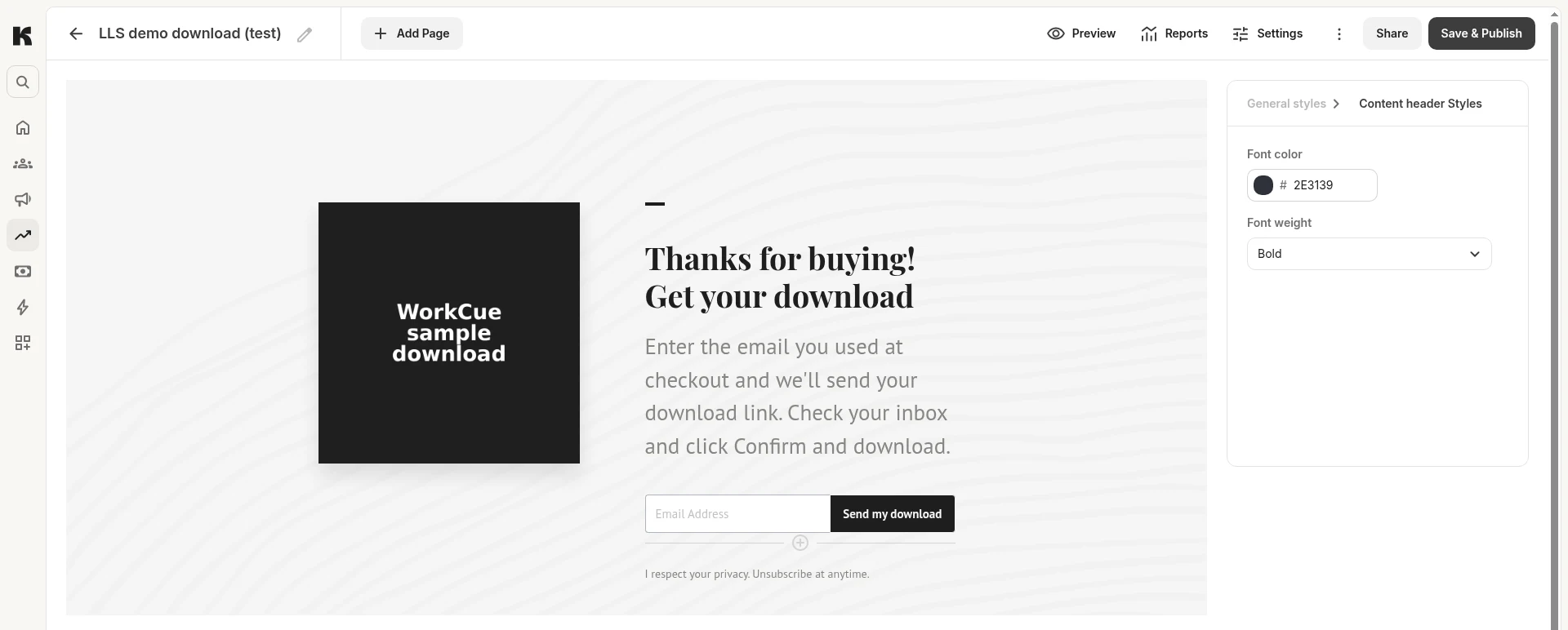
Step 3: Turn on double opt-in and attach the file. Click Settings to open Landing Page Settings. It has five tabs: General, Domain name, Confirmation email, Advanced and SEO & Analytics. On Confirmation email:
- Send confirmation email: checked.
- Auto-confirm new subscribers: leave it unchecked. That's what keeps double opt-in on, so the file only goes to an address that really receives mail.
- After confirming redirect to: switch the toggle from URL to Download and upload your product file. We uploaded
workcue-sample.pdf. - Click Save.
Kit's troubleshooting page says downloads fail less often if the filename is under 20 characters, with no spaces, underscores or accented letters. Rename My Template Pack v2.pdf to templatepack2.pdf before you upload.
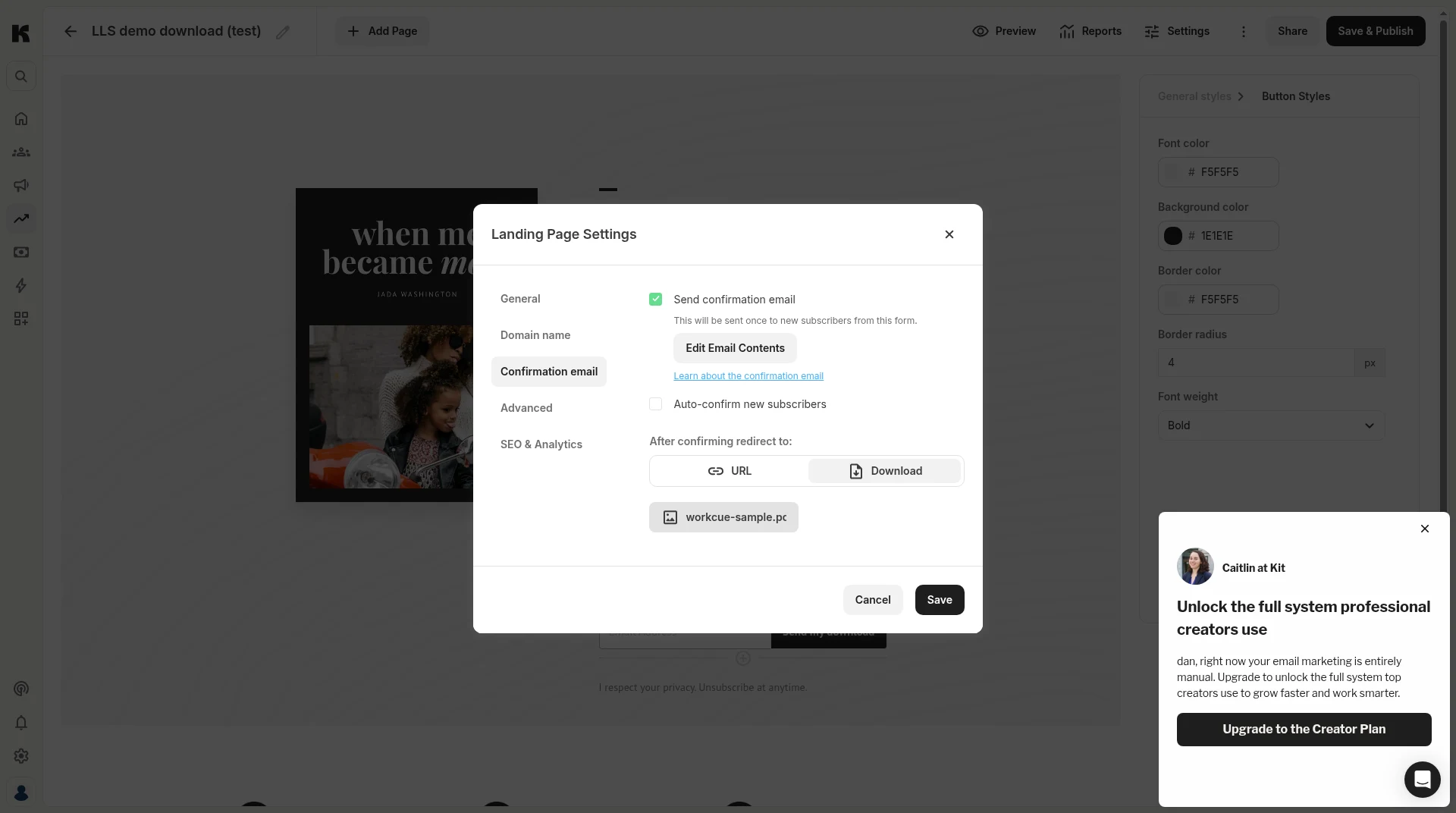
Step 4: Edit the confirmation email. On the same tab, click Edit Email Contents. Kit opens a Confirmation email dialog.
- Subject line: we used "Confirm to get your download".
- Button: click the button block and change its text from "Confirm your subscription" to "Confirm and download". You can't change where it points: Kit's side panel says "This URL is fixed for the confirm button" and sends you back to the confirmation email settings for the redirect or download.
- From address: send from an address on your own domain, or the email may land in spam. Ours is
Dan at WorkCue <hello@useworkcue.com>(see our verified sending domain guide).
Kit adds the footer for you: Unsubscribe and Update your profile links, the postal address from your account settings, and a "Built with Kit" badge that stays on the free plan. Use a business address or PO box there, not your home.
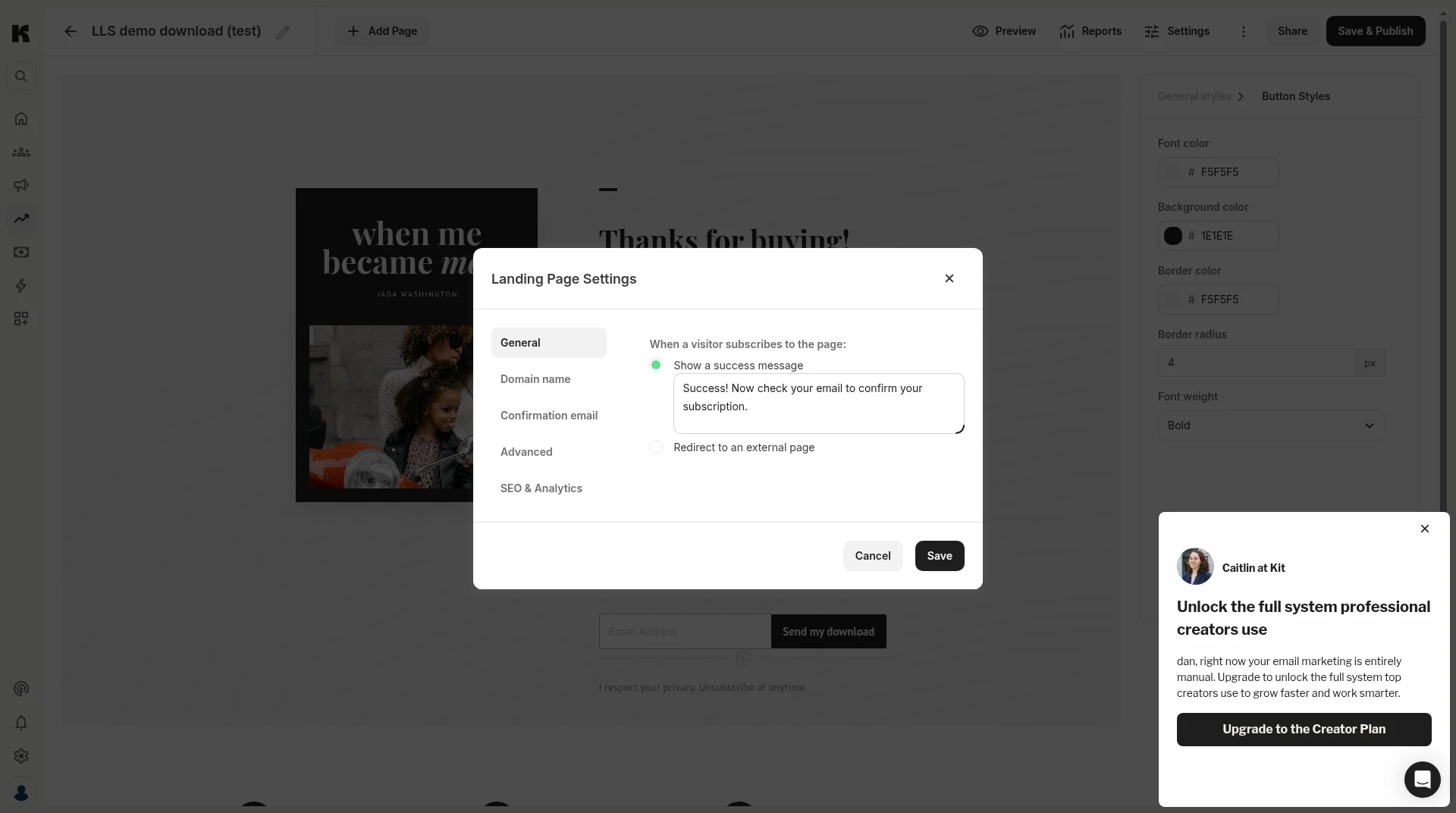
Step 5: Set what buyers see after they submit. Back in Landing Page Settings, open the General tab. Under When a visitor subscribes to the page:, select Show a success message. Kit's default text is "Success! Now check your email to confirm your subscription." We kept it for the demo; for buyers, something like "Check your inbox and click Confirm and download. Your file starts right away." is clearer. Click Save.
Step 6: Publish and copy the address. Click Save & Publish. There's no extra confirmation step: the page goes live straight away. To get its address, click Share. Kit shows "Your landing page is ready to share" with the URL, a copy button, a WordPress embed option and share buttons. Don't use those share buttons for this page. Its address goes in one place only: your checkout's redirect.
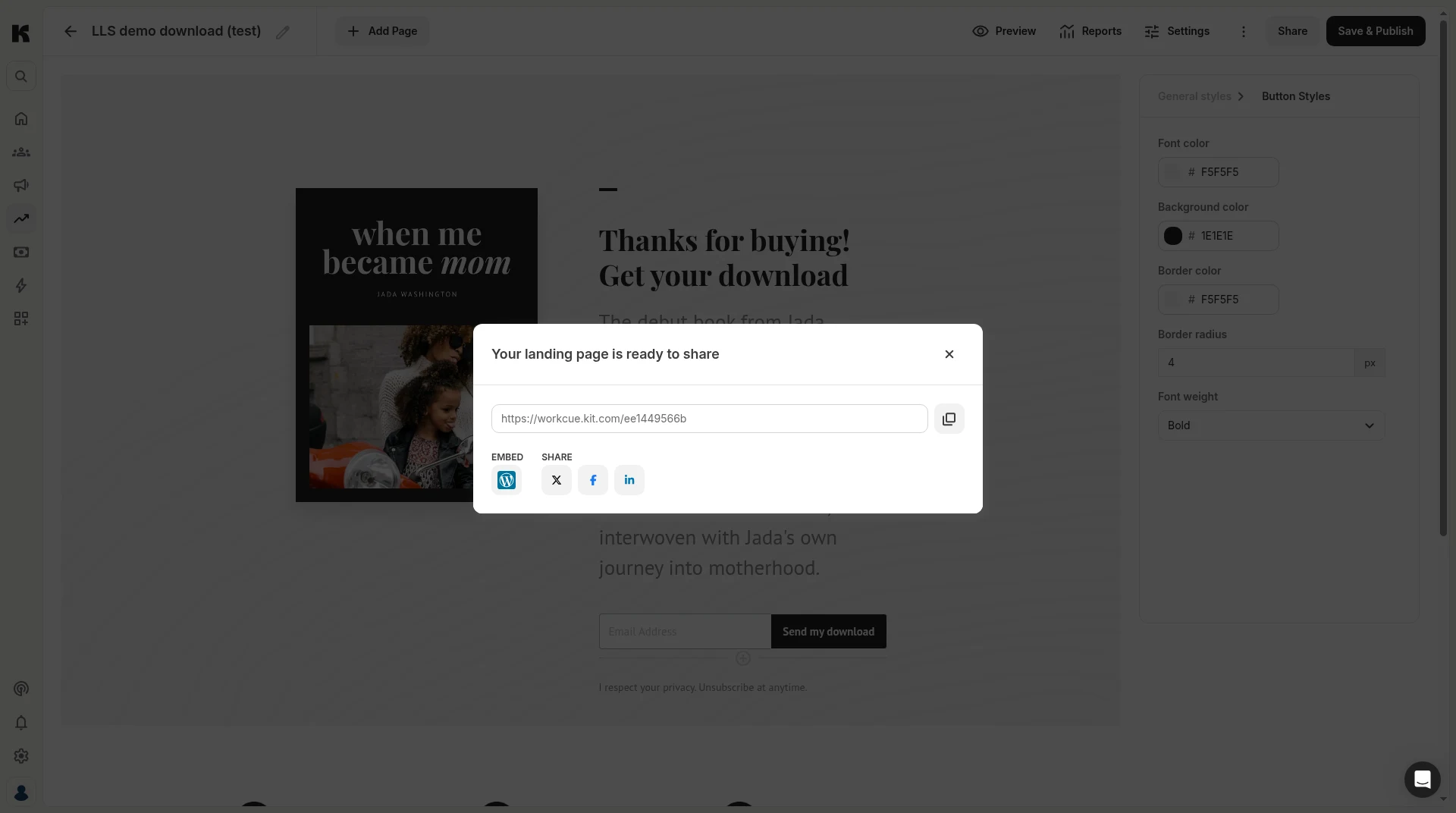
Our demo page is live at workcue.kit.com/ee1449566b. It hands out a sample PDF, nothing is for sale, and signing up adds you to the WorkCue list (you can unsubscribe from the first email).
Step 7: Create a Stripe payment link with Managed Payments on. Do this in the Stripe Dashboard in a browser. Stripe doesn't support creating Managed Payments payment links in the iOS app. Activate Managed Payments in your Dashboard first, and confirm your product is eligible.
- On the Payment Links page, click New (or click the plus (+) symbol and select Payment link). Stripe's create-a-link docs also show this button as +New.
- Select an existing product, or add a new one for your $9 download. If you add a new product, fill in the details and click Add product.
- Give the product a tax code from Stripe's eligible list. Eligible codes are labeled Eligible for Managed Payments. Digital media such as e-books and digital images or artwork is a supported category. For a downloaded ebook with permanent access, the eligibility table lists
txcd_10302000(Digital Books - downloaded - non subscription - with permanent rights). Pick the code that matches what you sell. - Make sure Enable Managed Payments is selected. You can only do this if every product on the link is eligible.
Step 8: Redirect after payment to your Kit page (or a thank-you page), then create the link. When you create or edit the payment link, click After the payment (Stripe's fulfillment docs also call this the After Payment tab). Under Confirmation page, select Don't show confirmation page so Stripe redirects the buyer to your URL instead of showing its own confirmation page. Paste your Kit page URL:
https://workcue.kit.com/ee1449566b
Then click Create link.
If you'd rather send buyers to a thank-you page on your own site, use that URL instead. You can include {CHECKOUT_SESSION_ID} in the redirect URL if you want to look up the Checkout Session and tailor the page. You don't need that parameter for the Kit page: Kit won't read it.
Step 9: Know the limits of this redirect. Two things to keep in mind:
- Once you create a payment link with Managed Payments on, you can't switch it off on that link. You'd create a new link instead.
- The redirect is not a secure gate. Anyone who has the Kit page URL can open it and get the file without paying. Stripe also says not to rely on the redirect alone for fulfillment, because a buyer can pay and then lose the connection before your page loads. For this $9 PDF flow, the Kit page is the download, so if a buyer never arrives there, they won't get the file unless you send it another way. After a payment link payment, Stripe sends a
checkout.session.completedwebhook you can use for that.
Step 10: Test the path before you share the live link. Stripe's Managed Payments payment links docs describe a test checkout: open the payment link URL, enter different billing addresses to see how tax is calculated, and pay with the test card 4242 4242 4242 4242 (any CVC, any future expiry). After the payment, you should land on the Kit page. Enter a labelled test address of your own, open the confirmation email, click Confirm and download, and check that the file downloads. In sandbox mode, Stripe doesn't send receipt emails automatically. You can still preview and send one from the payment: under Receipt history, click View receipt, then Send receipt.
Sources: Kit: The Confirmation Email, Kit: Troubleshooting confirmation downloads, Stripe: After a payment link payment, Stripe: Managed Payments payment links, Stripe: Create a payment link, Stripe: Fulfill orders, Stripe: Managed Payments eligibility, Stripe: Build a Checkout integration with Managed Payments. Kit sources and screens checked Nov 16, 2026. Stripe pages rechecked Nov 17, 2026. The Kit screens above are from our own demo page, built on Kit's free plan on Nov 16, 2026. Kit's help center uses slightly different names for some of them; we used what the app showed us. For a longer walkthrough of the same Kit setup, see our lead magnet landing page guide.
Option B: sell the file inside Kit (but Kit isn't a merchant of record)
Kit can sell the product itself, on the free plan. When you create a product, choose Send a file as the fulfillment method and Kit delivers it after payment, on the confirmation page and with a Download button in the receipt email. Selling in USD costs 3.5% + $0.30 per transaction, which on $9 is $0.62, so you keep $8.38 (Kit: Sell digital products, Kit: Creating a product, checked Nov 16, 2026).
That's cheaper than any MoR, and here's why. Kit runs payments through a Stripe account and you're the seller. Kit's help page says it "collects Value-Added Tax (VAT) only" and that "US sales tax and Canada QST aren't charged or collected for you." It also only supports sellers in 39 countries (the US, Canada, the UK, most of the EU, Switzerland, Norway, Australia, New Zealand, Japan, Hong Kong and Singapore), and India, Ghana and Bangladesh aren't among them. It's a good fit if you mostly sell at home and already handle your own tax. It doesn't replace what Lemon Squeezy did.
We already walked through the same idea on another free tool in Sell a Digital Download on Systeme.io Free With Stripe.
Migration checklist
Based on Lemon Squeezy's migration planning guide and FAQ, checked Nov 16, 2026.
This week (before December 2)
- Check whether you can use Managed Payments at all: is your business based in one of Stripe's supported locations, and is your product digital and fully automated?
- Update the contact email in your Lemon Squeezy account, so you get migration and tax notices.
- Export your orders: on the Orders page, click Export. Lemon Squeezy emails a CSV to the store owner. It includes each customer's name, email, country, product, variant, tax and total.
- Export your license keys if you sell software. There's no export button mentioned in the docs, but the Lemon Squeezy API's List all license keys endpoint returns them, filterable by store and product. Do this now: Lemon Squeezy warns customers may lose access to files, links and keys after March 31, 2027 if you haven't moved them.
- List every place a Lemon Squeezy link appears: your site, buy buttons, emails, sequences, affiliate links, social bios, PDFs. None of them will redirect.
- If you sell subscriptions, turn off PayPal in your Lemon Squeezy checkout. PayPal subscriptions can't move to Managed Payments.
- Archive products and discounts you don't use. Resolve open disputes.
From December 2 (if you're moving to Managed Payments)
- Open the Migration Hub at app.lemonsqueezy.com/migration. It creates a Stripe sandbox with copies of your products and payment links so you can test first. It also creates your products in Stripe, moves your customers with a report mapping old IDs to new ones, and moves eligible card subscriptions after giving customers at least 14 days' notice.
- Note that installing the migration toolkit is what starts the 1.5% promo price.
- Each Lemon Squeezy variant becomes its own Stripe product, so check your product list after the import.
- Set up file delivery (Polar, Creem, Kit or another tool) and test it end to end in test mode.
If you're moving somewhere else
- Pick your provider using the table above, sign up and wait for approval before you switch any links. Account reviews take time.
- If you need to move data or card subscriptions to another provider, fill in Lemon Squeezy's intake form under Settings > Migration. Only card subscriptions can move to another provider.
Before mid-January 2027
- Start the actual switch. Lemon Squeezy says the whole process can take up to 8 weeks.
- Tell your customers where to find their downloads and keys from now on, and what the new charge will look like on their statement (LINK.COM* for Managed Payments).
- Update your refund and support replies (our refund and support reply templates are a starting point).
Before March 31, 2027
- Replace every Lemon Squeezy link, embed and webhook.
- Check that past buyers can still get their files and keys on the new setup.
- Save your Lemon Squeezy exports somewhere safe. Tax documents for past payouts come through the payout account you used (Stripe Express, PayPal or Wise).
What we couldn't verify
- Paddle's fee base and small-order pricing. Paddle doesn't say on its pricing page whether 5% + 50¢ is charged on the price or the total with tax, and it offers bespoke pricing under $10. We used the total.
- Managed Payments tax coverage count. Stripe's Managed Payments page and docs say tax compliance in "80+" or "more than 80" countries. Stripe's pricing page says "more than 75". Both were live on Nov 16, 2026.
- Managed Payments payout timing. Stripe's pricing page offers rolling, weekly or monthly payouts, and the Managed Payments page says payouts can be "up to 4x faster" than monthly cycles. We didn't find a Managed Payments specific payout schedule in the docs.
- The Stripe redirect to Kit with Managed Payments on. Stripe's list of payment link settings that Managed Payments removes does not include the after-payment redirect (
after_completion). We wrote the steps from Stripe's current docs (checked Nov 17, 2026) and did not run a test or live payment ourselves. The Kit page is a public URL, so the redirect is not a paywall. - Whether Paddle accepts a non-software download. Paddle's developer docs mention ebooks and courses, but its help center says it works with software businesses. Check before applying.
Checked against official pages on November 16, 2026. Prices and country lists change; check the linked pages on the day you sign up.
Related guides
Sell a Digital Download on Systeme.io Free With Stripe
Sell a digital product on Systeme.io's Free plan: Stripe connection, price plan, a trimmed order form and a download button, from a real $9 setup.
Kit Lead Magnet Landing Page on the Free Plan
A Kit lead magnet landing page on the free plan: template, double opt-in that starts the download, confirmation email and an end-to-end inbox test.
Kit Emails in Spam? Verify Your Sending Domain
Verify a sending domain in Kit on the free plan with Cloudflare DNS: every SPF, DKIM and DMARC record we added, and a real before and after test.