Waitlist Page Before You Build: Kit Free Plan Pre-Sale
A waitlist page before you build, on Kit Free: planned price, decision date and a plain 'we may not build it' line, tested with both emails drafted.
A pre-sale page asks people to pay for something before it exists. That can be honest, if you have a firm build date and refund anyone automatically if you don't deliver. We didn't have either.
Our validation run ended with "not enough evidence yet, leaning proposals". So for our next product idea, a Scope creep reply pack, we built the honest version: a free waitlist page with a planned price, a decision date and a line saying we might not build it.
Why free, not paid
We asked one question: could we promise a delivery date today? The answer was no. #3 didn't clear our own bar, and we haven't written the pack. Taking money for it now would mean either inventing a date or holding people's money while we decide. A free list gives us a real signal (people choosing to hear back) without either.
What goes on the page
Three lines do most of the honesty work:
- "(not built yet)" in the headline. Nobody should have to read the small print to find that out.
- The decision line: "We may not build it. We'll decide on November 9, 2026, based on real questions and how many people join this list, and email everyone here either way. Joining costs nothing and doesn't commit you to buying."
- The overlap line: "If you own our Proposal Autopilot Kit, you already have the two prompts this pack builds on (P16 and P17). The pack adds ready-to-send replies and filled examples." If an existing customer might not need it, say so.
The contents list comes from material we already have: the scope creep guide, two kit prompts and our mini-course outline. There's no launch date, no "limited spots" and no early-bird price.
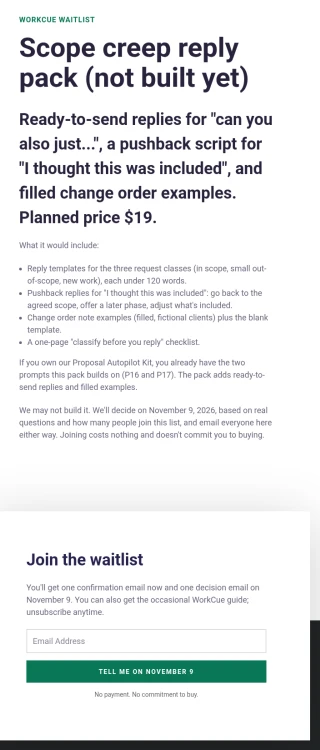
The form asks for an email only. The button says what happens next: Tell me on November 9. Under it: "No payment. No commitment to buy." The small print says what signups receive: one confirmation email now, one decision email on November 9, and the occasional WorkCue guide, with unsubscribe anytime.
Building it on Kit Free
We checked Kit's own help pages first. The Free plan includes unlimited forms and landing pages, plus tagging and segmentation, and the confirmation email can be switched on or off for each landing page. We didn't hit an upgrade wall anywhere.
We used the Classic builder and a template from Kit's Waitlist category. The template needed three small additions: an eyebrow line, a form heading and the line under the button. Kit's editor turns "1. " into a numbered list and swallows the lines after it, so we used bullets instead.
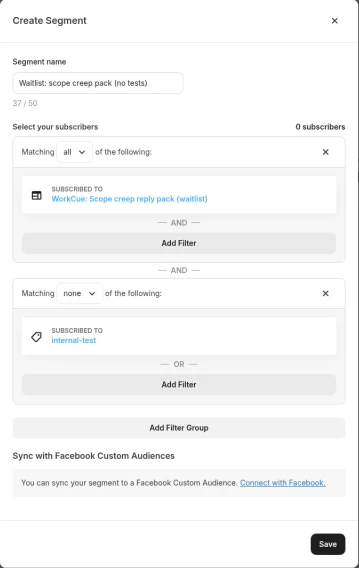
No tags needed. To count the waitlist, we made a segment instead of tagging signups. That's the same approach as our Kit tags and segments guide:
- Matching all: Subscribed to "WorkCue: Scope creep reply pack (waitlist)"
- Matching none: tag
internal-test(our test addresses)
One thing that tripped us up: in the segment filter, landing pages are listed under Subscribed to > forms. There's no separate "landing pages" option.
Test the signup, and see what a real person gets
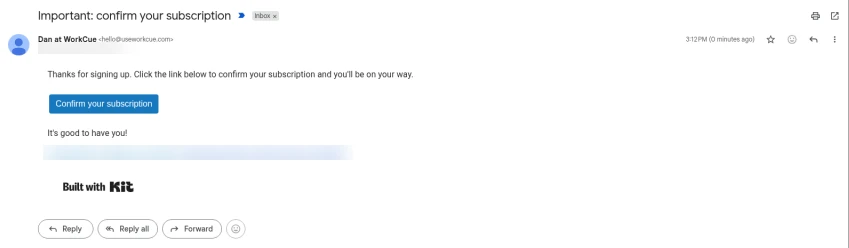
We signed up with a labelled test address at 3:12 PM PT. The success message appeared ("You're on the list. Check your inbox to confirm. We'll email you on November 9."), and the confirmation email arrived the same minute from our own sending address.
Clicking confirm leads to Kit's generic "Subscription confirmed!" page, which includes a Kit promo. It works, but a custom thank-you page would be better, so that's on our list.
Then we checked the subscriber's profile: "Not in any automations". Nothing else is sent to signups. After we tagged the test address internal-test, the segment showed 0 real subscribers at 3:13 PM PT.
Draft both decision emails now, send neither
Whatever we decide on November 9, the list has been promised an email. So we drafted both in Kit now, addressed to the waitlist segment:
- Draft A: "We're building the scope creep reply pack"
- Draft B: "We're not building the scope creep reply pack (here's why)"
Each has blanks for the real reasons and numbers, to fill in on November 9. Their subjects start with "DRAFT A, NOT SENT" and "DRAFT B, NOT SENT", so they can't go out by accident. With 0 people in the segment, Kit won't let them be sent anyway.
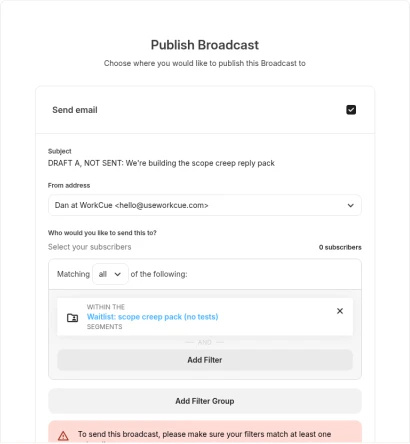
Writing the "not building it" email before you know the answer keeps you honest. If the list stays small, that email is already half-written, and it's harder to talk yourself into a launch anyway.
Where the page is linked
Only from the end of our scope creep guide, with the same "planned, may not be built, decision on November 9" wording. We're not running ads or posting it elsewhere. The count on November 9 will tell us how many readers chose to hear back, nothing more.
Your checklist
- Ask yourself whether you can promise a delivery date. If not, don't take money
- Put "not built yet" in the headline
- State the planned price, the decision date and "we may not build it"
- Tell existing customers if they already have part of it
- Count signups with a segment, excluding your tests
- Sign up yourself and read every email a real person would get
- Draft both decision emails before you decide
Related guides
Validate a Product Idea From Real Audience Questions
Validate a product idea from real audience questions on X, Reddit and our own lists, using a rule set first, and why the verdict was not yet.
Kit Tags and Segments on the Free Plan (Tag From a Form)
Kit tags and segments on the free plan: no auto-tag rule, so we tagged from the form itself, built five segments and excluded test subscribers.
Scope Creep With AI: Change Request Replies and Orders
Handle scope creep with AI: check client requests against agreed scope, draft a calm reply and a one-page change order, with human gates on price.