Systeme.io Order Bump and Upsell on the Free Plan
A real $5 order bump on Systeme.io's Free plan, delivered through the free community, plus a demo upsell: the limits, gotchas and what we could not test.
An order bump is the checkbox on a checkout page that adds a small extra to the order. An upsell is a page shown after payment that offers one more thing. Both can feel pushy. They're honest when the extra is real, related and plainly described.
We sell one product, the $9 Freelancer Proposal Autopilot Kit. For this guide we added a real order bump to its Systeme.io checkout on the Free plan, and built an upsell as a demo, which we then deleted. Here's exactly what happened, including the parts that didn't go to plan.
What's free, and what was already used
This is our My plan page at 2:49 PM PT, before we started:
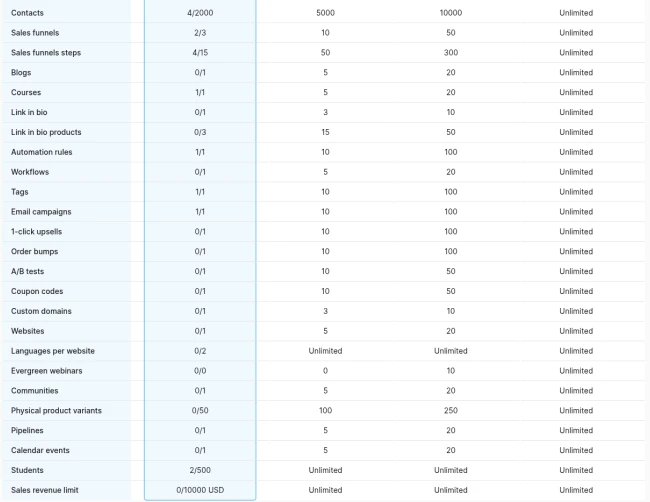
The Free plan includes 1 order bump and 1 one-click upsell. The catch is delivery. Systeme's help pages say a digital bump or upsell must deliver a course, course bundle, tag or community. Our only course and our only tag were already used by our free mini-course. The one delivery option left was the community (1 on Free, unused).
Step 1: Pick an extra you can describe honestly
We didn't want to invent a second product just to fill the slot. The extra is a convenience format of what the kit already contains: the proposal template, rate card and change order note as Word files, the 40-point scope checklist as an Excel sheet with a TRUE/FALSE column and a running score, and Markdown copies for Notion. A README explains how to open each in Google Docs or Sheets.
The bump copy says that plainly:
Yes, add the editable templates (+$5) The same proposal template, rate card, change order note and 40-point checklist that come in the kit, as Word, Excel and Notion-ready files you can open straight in Google Docs or Sheets. Same content as the kit, in editable form.
If a buyer already has the kit's Markdown and doesn't mind formatting it, they don't need this. That's fine. Saying so is what makes the bump honest.
Step 2: Set up delivery through the community (and its privacy trade-off)
We created a private community, "WorkCue Templates", with posts set to manual approval, and a "Start here" topic. Then we tried to attach the zip to a pinned post.
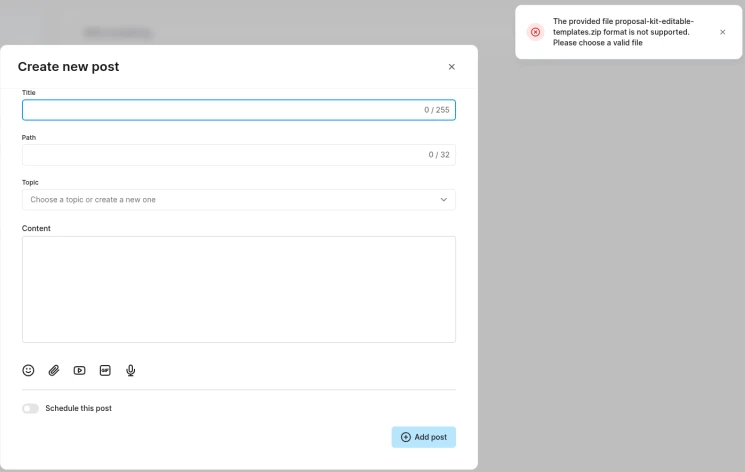
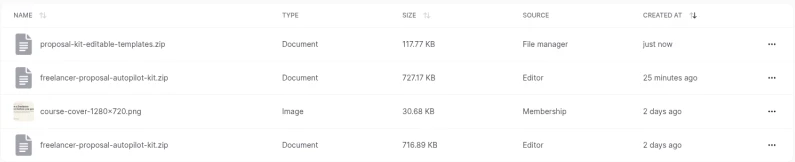
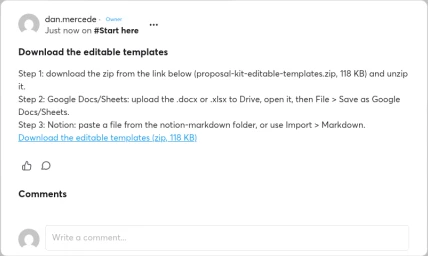
Community posts only accept images (JPEG, PNG, WebP), video and audio. So we used the fallback: we uploaded the zip to Systeme's file manager and linked it in the pinned post.
Two trade-offs, both disclosed to buyers:
- The file link isn't secret by itself. A file-manager link works for anyone who has it. The community hides the link; it doesn't lock the file. For a $5 template pack we accepted that. For anything more valuable, you'd want a course (which needs a paid plan once your one course is used).
- Members can see each other. Systeme's help page says that in a private community the member list is visible to members, and members can post and comment. We turned on manual post approval, but buyers would still see each other's display names. So the bump copy ends with: "Delivered in a private WorkCue members area, where other members can see your display name."
Step 3: Create the bump offer
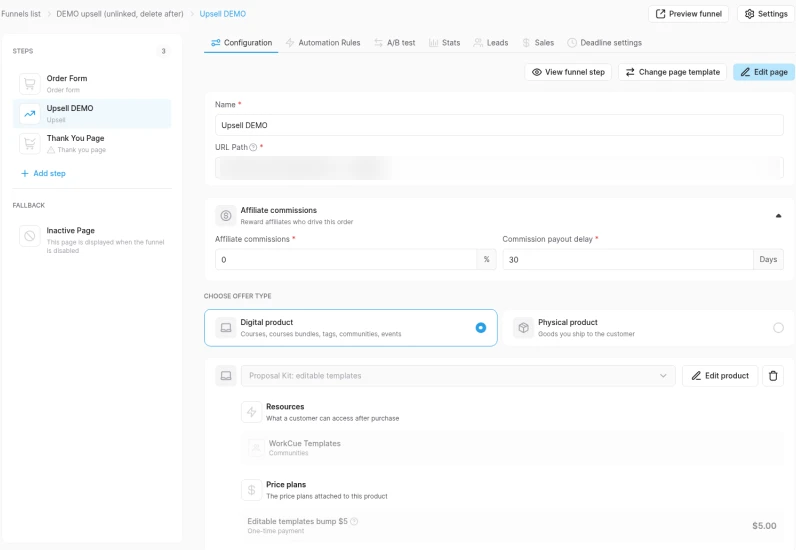
On the kit funnel's order form step, we added the order bump: Digital product, a new product "Proposal Kit: editable templates", the community as the resource, and a $5 one-time price plan.
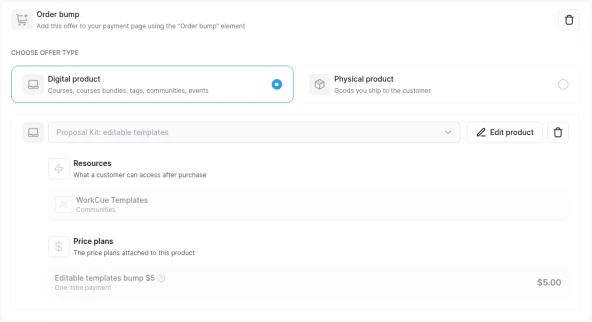
Two gotchas while creating the price plan:
- The Create button stays disabled until you fill in the statement descriptor (up to 22 characters). That's the text on the buyer's card statement. We used "WORKCUE TEMPLATES".
- The resource picker offers "Calendar events", even though the help page says events can't be used for a bump. We didn't try it.
Then, in the page editor, we dragged the Order bump element under the country field. The headline is set in the element's settings ("Order bump name"); the description is a text block inside it you edit on the page.
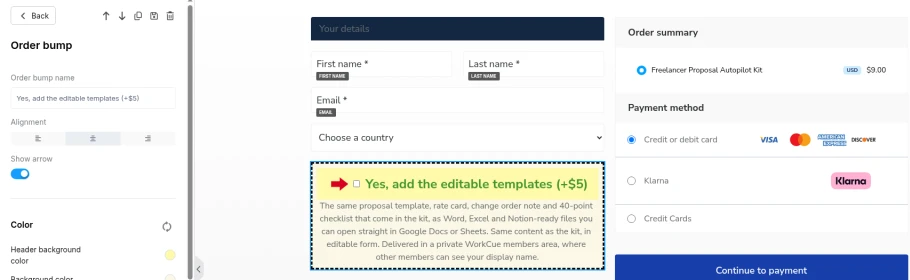
The editor's Save showed no confirmation, but the change was live on reload:
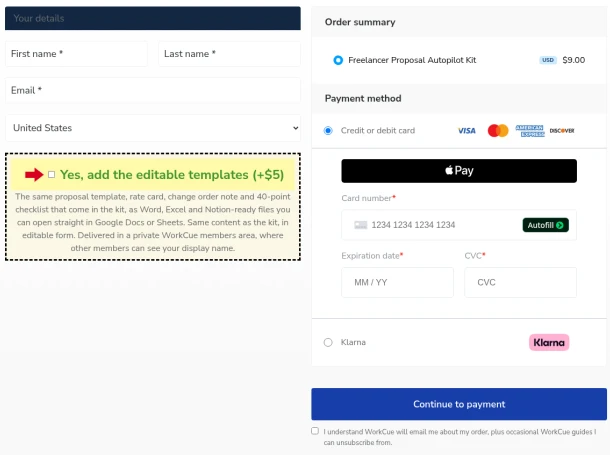
Step 4: The upsell, and the upgrade prompt we hit first
We had no second real product to upsell, so we decided to build the upsell as a demo on a copy of the kit funnel, never link it, and delete it afterwards.
Duplicating the funnel failed. The first click did nothing, with no message. On the second try:
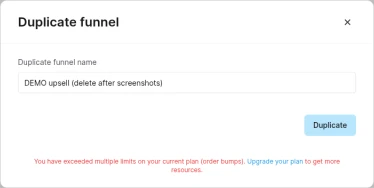
So we created a fresh funnel instead. Three things to know:
- Currency defaulted to Euro. We changed it to U.S. Dollar before adding anything.
- The order form step needed a page template before its offer settings appeared. We used the existing $9 kit product, with no bump.
- "Add step" puts the new step at the end, after the Thank You page, which is the wrong place: an upsell must come between the order form and the thank-you page. Keyboard reordering didn't work; a slow mouse drag did, and the order held after a reload.
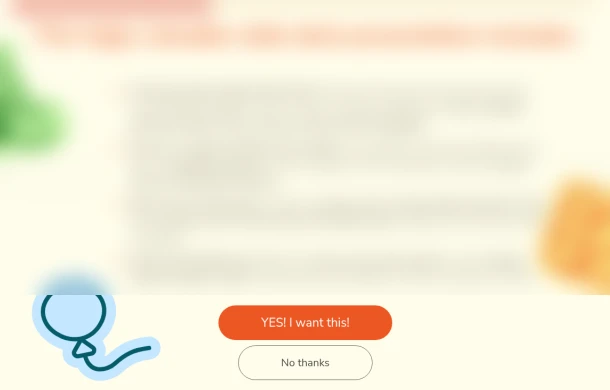
The upsell template already includes the Accept and Decline buttons Systeme requires. It also came with placeholder sales copy for an unrelated example product. We left that placeholder text as it was, because the page was never linked or shown to anyone and we deleted the funnel minutes later. It's blurred here:
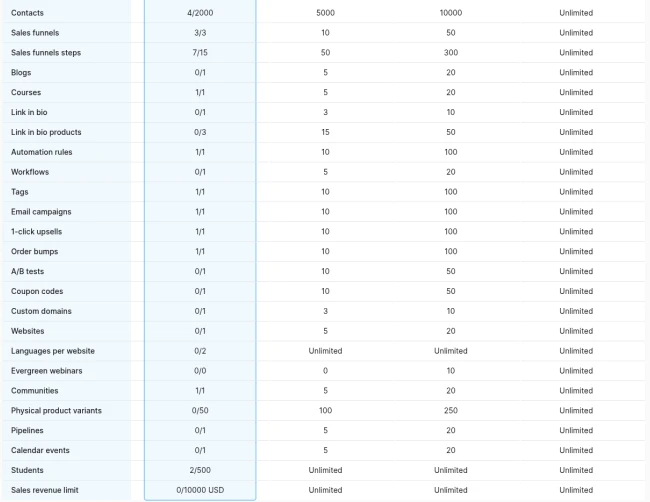
While the demo existed, the counters showed funnels 3/3, steps 7/15 and upsells 1/1, with no limit prompt:
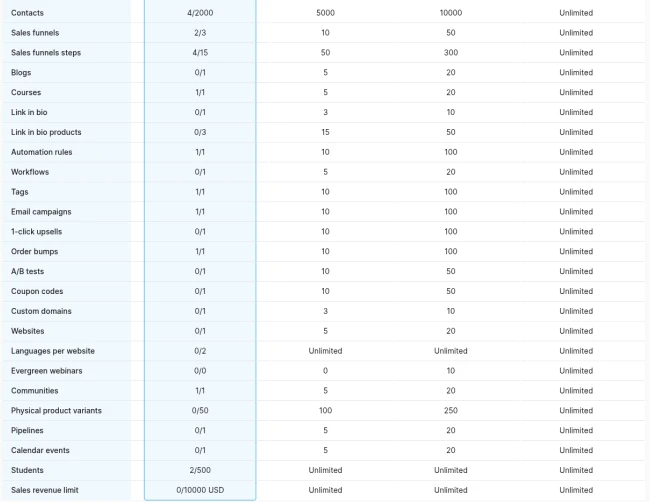
Then we deleted the funnel. The funnels list went back to our two real ones, and the counters to: funnels 2/3, steps 4/15, upsells 0/1, order bumps 1/1, communities 1/1.

Counters: before, during, after
| Counter | Before (2:49 PM) | During demo (3:02 PM) | After (3:04 PM) |
|---|---|---|---|
| Order bumps | 0/1 | 1/1 | 1/1 |
| 1-click upsells | 0/1 | 1/1 | 0/1 |
| Communities | 0/1 | 1/1 | 1/1 |
| Sales funnels | 2/3 | 3/3 | 2/3 |
| Funnel steps | 4/15 | 7/15 | 4/15 |
| Tags, courses, automation rules | 1/1 each | 1/1 each | 1/1 each |
With the bump and community used, this Free account now has no room for a second paid extra. That's a real limit worth knowing before you plan a funnel.
What we couldn't test
We didn't buy anything. Systeme.io has no Stripe test mode, and our rule for these guides is no real-money purchases. So we can't show the bump being charged, the buyer receiving community access, or the confirmation emails. Systeme's help pages say a bump and an upsell are each charged as a separate transaction from the main order, and that PayPal may show only the main price in its window.
If you set this up for your own product, a cheap way to check delivery is to buy it yourself once, then refund it in Stripe. That's a real charge, so decide that for yourself.
As of October 10, 2026, the bump has earned $0. The checkout is new and our list is small, so that number says nothing yet.
Your checklist
- Only bump something real and related, and say exactly what it is
- Check what your bump can deliver on Free: course, bundle, tag or community
- Remember community posts won't take a zip; use the file manager and link it
- Tell buyers if other members can see them
- Fill in the statement descriptor; it's required
- On a new funnel, check the currency first
- Drag a new upsell step between the order form and the thank-you page
- Note your plan counters before and after
Related guides
Sell a Digital Download on Systeme.io Free With Stripe
Sell a digital product on Systeme.io's Free plan: Stripe connection, price plan, a trimmed order form and a download button, from a real $9 setup.
Systeme.io Free Course With Auto-Enrolment: A Real Build
A free 5-lesson course on Systeme.io's Free plan with an opt-in page that auto-enrols and tags people: every screen, plan limits and gotchas.
Validate a Product Idea From Real Audience Questions
Validate a product idea from real audience questions on X, Reddit and our own lists, using a rule set first, and why the verdict was not yet.